How to set up connectors
Plug your real tools into Claude (or ChatGPT) so it does the work — not just the advice
Why bother
Most of us use AI like a place we go for advice. You ask it what to do, it tells you, and then you go and do the work — clicking between your calendar, your inbox, your docs, gathering all the context by hand. You're the friction.
A connector plugs one of your tools straight into the AI, so it can reach in and do the gathering itself. Set it up once. Here's how.
The Setup
Open connectors from the + button
No need to dig through settings. In the Claude desktop app, click the + button by the message box and choose Add connectors → Browse connectors.
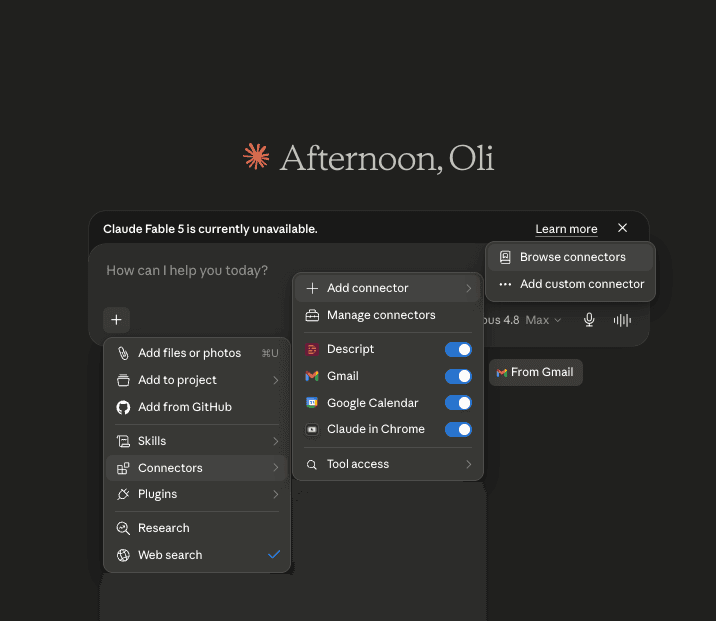
→ You land in the connector directory — everything you can plug in.
Search for the tool you want
Browse or search the directory — Google Calendar, Gmail, Slack, Canva, Google Drive and loads more — and pick the one you're tired of doing by hand.
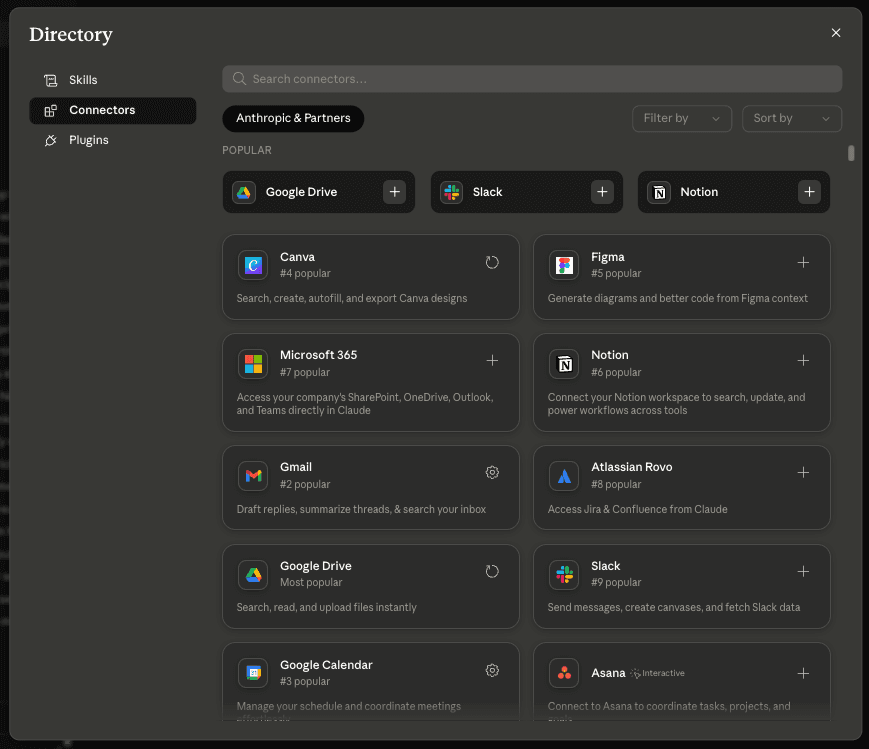
→ Found it? Open it and you're one click from connected.
Connect and sign in
Click Connect. It runs you through a quick sign-in wizard for that tool — log in and approve the access it asks for. That's the tool checking it's really you.
→ The connector flips to 'Connected'. That's the hard part done.
Check it's switched on
It usually switches on by itself. If it doesn't, just flip the toggle so it's on for your chat.
→ Claude can now reach into that tool when you ask.
Ask it to do the work — not for advice
This is the bit people miss. Don't ask what to do — ask it to do the thing. “Prep me for my next meeting.” “Find the last email thread with Sarah.” “Catch me up on the launch channel in Slack.” The first time it acts, it may ask you to confirm.
→ It does the gathering. You stop being the messenger between your own apps.
Try this first
Connect your calendar and your Gmail, then paste this in. It pulls who you're seeing and the last thread with them, and hands you a brief — in one go.
Your 2pm — Sarah Chen, Acme
- Who: Head of Ops — evaluating the pilot
- Last spoke: two weeks ago, on pricing and rollout timing
- Follow up: send the revised quote she asked for
Good ones to start with
A few honest notes
- -There isn't a connector for everything yet — but there's one for most of the big tools, and the list grows every week.
- -Some connectors need a paid plan (Pro / Team) on Claude or ChatGPT.
- -You're granting access to real accounts. Only connect tools you're happy for the AI to read — and check its work before you let it send or change anything.
- -Got a tool that isn't listed? You can usually add a custom one by URL (an MCP server) from the same Connectors menu.
Want to get better at this?
Let's set up your agent ecosystem.
This page is one job. The whole thing is a set of them running off the same foundation, the folder your AI works out of, the brief on how you like things done, the accounts it can reach and the skills that run off all of it, so your admin gets done the way you would do it. It is what I teach one to one, on your own machine and against your own work, and the quickest way to find out what yours would look like is a proper chat about it.
Not ready for a call? Start with the free agent series, what an AI agent actually is, and build up from there.